by admin | Nov 28, 2025 | Frequently Asked Questions
Why is Stopping SEO Services a Bad Idea?
In this short video, we’ll discuss why Search Engine Optimization should always be part of your ongoing marketing efforts. And why is canceling a bad idea that is likely to harm the gains already achieved?
Introduction
In the ever-evolving digital world, SEO is your key to success, but what happens when you turn that key off and decide to cancel it? We understand it can be a difficult decision to continue with SEO services. In this short video, we’ll discuss why search engine optimization should always be part of your ongoing marketing efforts and why canceling is a bad idea that is likely to have a negative impact on the gains already achieved. SEO is the fuel of your website; it attracts organic traffic and prospects by enhancing visibility. Neglecting SEO is depriving your website of that fuel, leading to a significant decrease in potential customers.
Canceling SEO Services:
- Gives Your Competition An Advantage
- Allowing them to capture those customers who are actively searching for products or services related to your industry.
- You Will Miss Lead Generation Opportunities
- Miss out on the chance to attract targeted traffic to your website, resulting in fewer opportunities to convert visitors into leads and long-term customers.
- Damage Your Brand Credibility
- Halting SEO can gradually erode the credibility you’ve established with search engines and your audience. Your Search Engine Rankings may also decline, potentially causing customers to question the credibility of your business.
- Increase in Costs
- Without organic traffic from SEO, you might need to rely more on paid traffic, which could increase your marketing costs in the long run.
- Lose Money Already Invested in SEO
- The long-term consequences of canceling SEO can have detrimental effects on your website, making it difficult to recover. This, in turn, can lead to the loss of the money you have already invested in SEO.
- Decrease Online Visibility
- Canceling search optimizations means neglecting ongoing technical optimizations that search engines are looking for. These issues include broken links, crawl errors, duplicate content, and incorrect redirects. This will cause search engines to struggle to understand and display your website effectively, leading to decreased visibility.
- Lack of Proper Keyword Targeting
- Finally, SEO involves keyword research and optimization, ensuring that your website targets the newest and most relevant keywords and search queries. If you cancel, you miss chances to optimize your content with those important keywords, making it harder for people to discover your site. As a result, you could miss out on potential customers who are actively looking for what you offer.
Simply put, SEO plays a vital role in achieving online success, offering numerous valuable advantages that surpass any short-term cost savings from neglecting it. It’s crucial to understand that search rankings are constantly evolving, and simply attaining a position on the first page is not enough. Sustaining the position requires a proactive approach and an ongoing effort.
When stopping SEO, it means your site will have less fresh content and decreasing backlinks as they go through normal attrition online; therefore, you’ll start losing domain authority. Technical SEO is also a factor that needs continuous monitoring and optimization. For example, robot files that are out of date, broken links, not indexing pages, etc., can cause Google to lower the trust and authority score as well, negatively impacting rankings.
Keep in mind that Google also performs constant algorithm updates, and without regularly reviewing your website’s SEO tags, titles, link structure, sitemap, and more to ensure you are complying with search engine algorithm changes, you can negatively impact the website rankings.
This is why SEO is so valuable and a long-term marketing strategy. SEO needs to be part of the marketing strategy as long as there is a website.
In Conclusion
Canceling SEO is not a good idea as it results in decreased visibility, loss of potential customers to competitors, missed opportunities for targeted traffic and leads, hindered long-term growth, technical issues, declining search rankings, and wasted investment. Continuing SEO efforts is essential for maintaining a competitive online presence and maximizing business success. Let us assist you in creating a winning SEO plan that will keep your online presence strong and thriving! Contact us today!
by admin | Oct 30, 2025 | Access Related Questions, Getting Started, Google, Google Properties, Onboarding MAD SEO, Uncategorized
How To Grant Access On UA/Google Analytics 3
Steps to Provide Access to UA/Google Analytics 3
See below the steps for providing managerial access to an email ID that your project manager will provide:
1. Log in to your Google Analytics account: (https://analytics.google.com/)
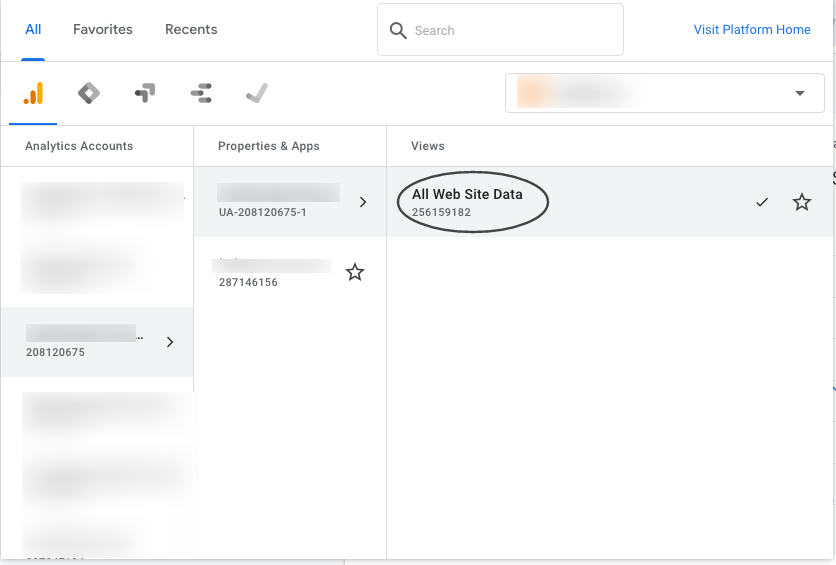
2. Search your .com (with the domain name or Google Analytics code)

3. Click on “All Website Data”

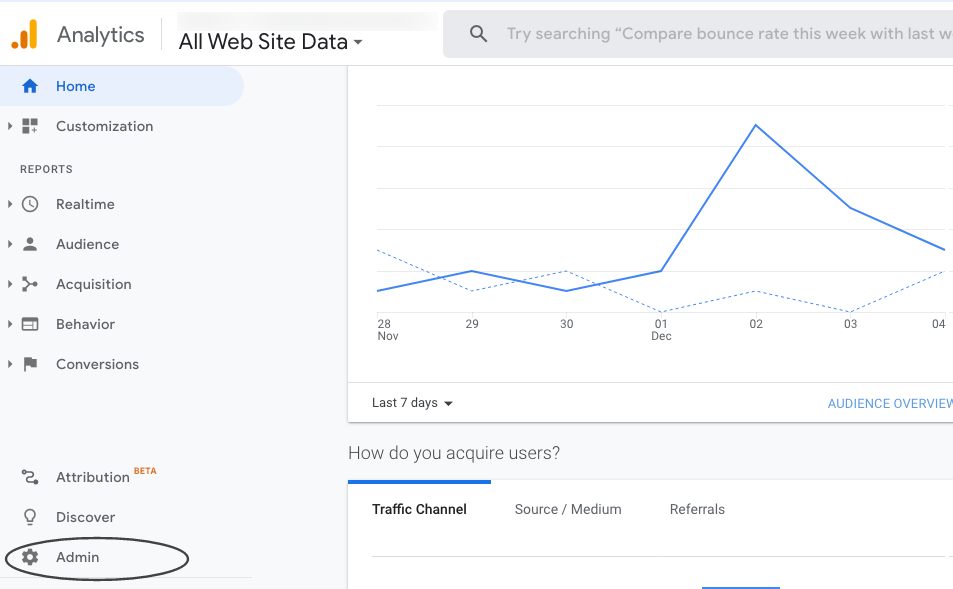
4. Click on “Admin”

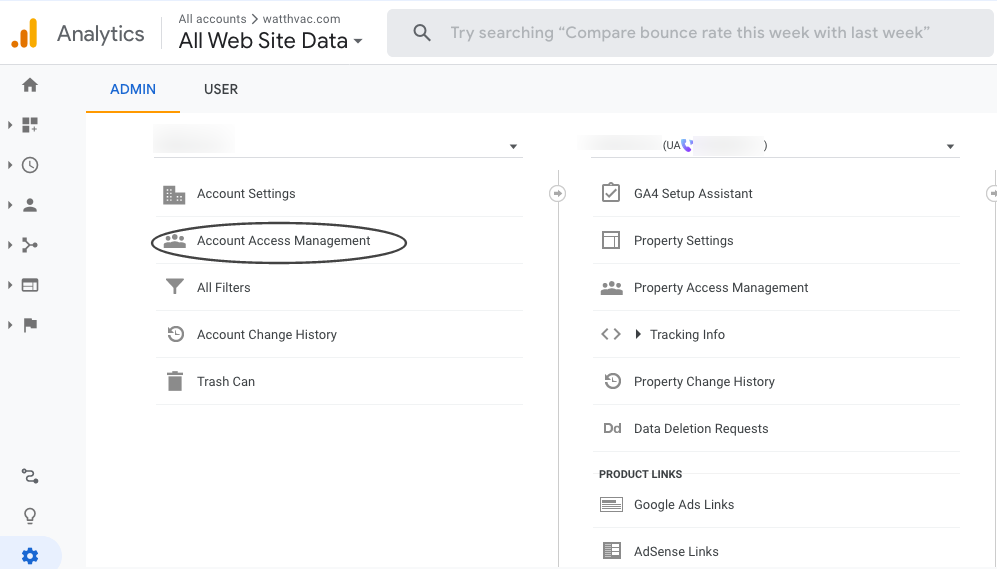
5. Click on “Account Access Management”

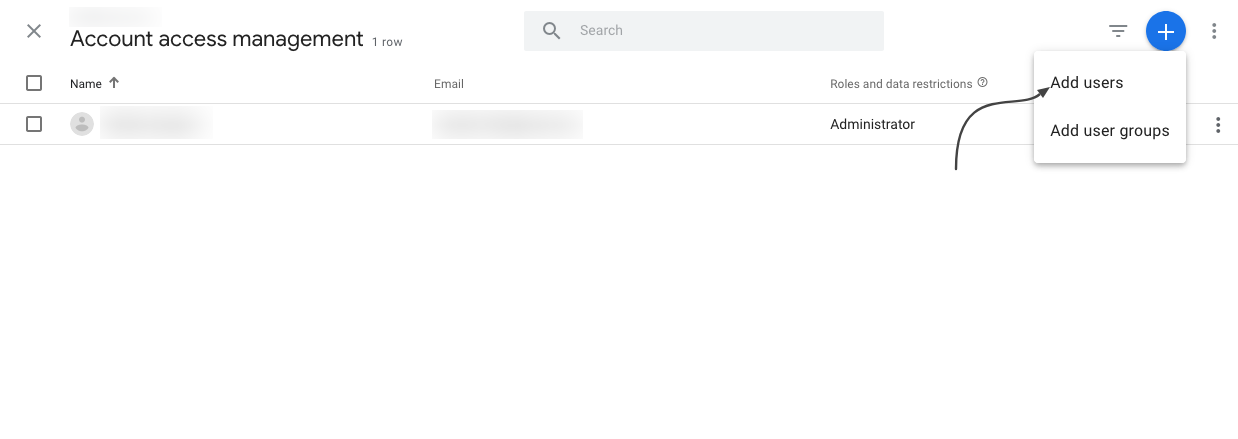
6. Click on “+” icon, choose “Add Users” and enter the email ID

7. Full access should now be granted

For any questions, contact [email protected]
by admin | Oct 30, 2025 | Getting Started, Google, Google Properties, Onboarding MAD SEO
Steps to Provide Access to Google Analytics 4
Google Analytics 4 is replacing Universal Analytics. On July 1, 2023, all standard Universal Analytics properties will stop processing new hits. Alpha SEO is already aware of this change, and we are working to integrate this update into our dashboard.
Please follow the steps below to grant access to Google Analytics 4 (GA4) to the email ID that the project manager will provide.
1. Select the GA4 account

2. Select Admin

3. Go to Property —> Select GA4 Account —>

4. Click On Account Access Management

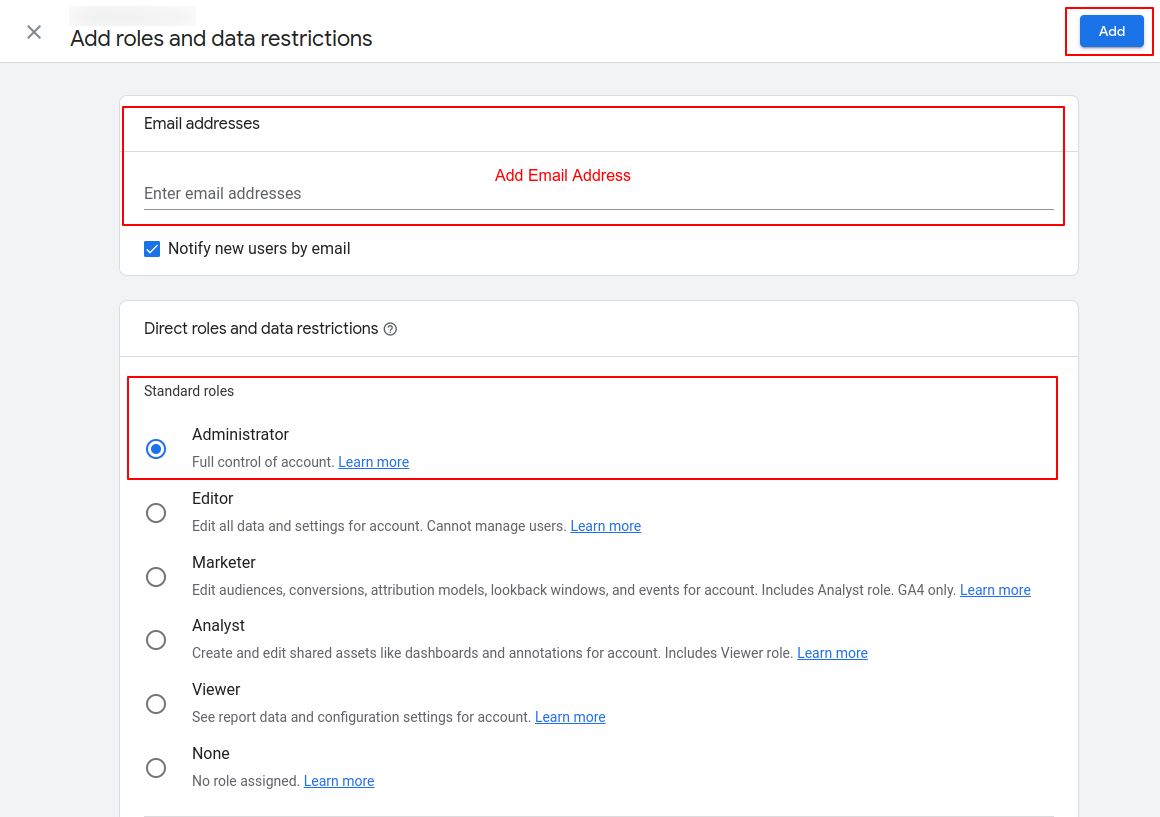
5. Click on the (Blue + right top corner) button and click on Add Users

6. Add the Email ID, then select Administrator under Standard roles and click “Add”.

All set!
Please confirm with the project manager once this is done, and we will confirm access.
For any questions, contact [email protected]
by admin | Jul 3, 2025 | Network Issues
How do I get my network (HAR) file?
There may be instances where you are not able to access areas of the platform while others are able to. In some cases, this can be linked to your Network settings blocking specific domains through which we load some of our resources that you are accessing.
In order for our Technical Support Team to better troubleshoot these types of issues, we may require your Network (HAR) File to identify these errors or the root cause of the problem. The following instructions will allow you to get your Network HAR File.
1. Go to the Login page on Business/Partner Center (or any area of the platform that you are having issues in) > Right-click on the page and select “Inspect” from the selection panel that pops up
2. In the console that pops up select the “Network” tab > Select Preserve Log > Complete the same action you were attempting to> You should see a bunch of information populate in the window that pops up
3. With the network panel open, Refresh the page and attempt the action again (if there is an action)
4. Right-click on any of the lines/info > Select “Save all as HAR File with content” > Save it to your documents or area on your PC you wish to access it from.
5. You can then email the file to the Support On Demand team upon request for us to diagnose. The HAR file may be over 35mb’s, if so we recommend file sharing with Google Drive.
Network HAR File Console.

Retrieve your HAR file from Safari
To get your HAR file in Safari, navigate to the menu bar at the top of the screen, and click on where it says “Safari” then select Preferences > Advanced.
Make sure the option “Show Develop menu in the menu bar”, the last setting, is selected like so:
Then, you should be able to proceed with getting a HAR file like normal from the browser. Right click > Inspect element > network > check preserve log > refresh page > right click on any lines that appear > select Save HAR.
Walkthrough Video
by admin | Jul 2, 2025 | Getting Started, Onboarding MAD SEO
After placing an order in MAD Monkey Media Digital Store, The MAD Monkey SEO team gets to work for you!
Check out this short video.
Below are some of the activities we perform during the first 24-48 hours:
1. Order Confirmation & Welcome Email
- First, you will get assigned a project manager and you will receive a welcome email with any questions regarding your order.
- Your project manager will be your main point of contact for your campaign and communication is done via email.
- Your project manager will be coordinating with our different SEO teams and send you anything that needs your revision or approval via email. You can reply to the email directly from your inbox.
*Please note this is a white-label product so we don’t typically communicate directly with the end client. All communication is through the agency partner who handles the relationship with their end client.
2. Access Check-up & Keyword Analysis. The project manager will work on the below and send you anything that requires assistance.
- Check the website access is sufficient to upload the SEO work. We need Admin Access in order to upload the SEO on-page work. Website Access Guide
- Check Google Analytics and Google Business Profile status and request access. Steps here
- Perform a keyword research analysis and provide you with a list of recommended keywords for you to choose from.
- Check out our Resource Page for help with access and FAQ’s: https://madmonkey.media.com/resources/
3. Dashboard Set-up
- We will also set up your SEO dashboard automatically after placing an order. After a few days, data will begin to show on your dashboard as the work progresses.
- Click here to learn how to access your SEO dashboard. If after following these instructions you still have issues accessing your SEO dashboard, please contact your MAD Monkey Media representative.
- Watch this video for an overview of the SEO dashboard.
After all the initial set up is completed, we get to work on your campaign!
We put together a benchmark report to track the progress of your campaign in the coming months. Simultaneously, we start working on deliverables of your campaign such as on-page optimizations and off-page link building.
After 1 month, you will get your first report! The report will include all the work completed, benchmarks, and new rankings. You can also access the data via the SEO dashboard in real-time!
Remember, you can always access our Support Page on the website for any questions or contact us via email at [email protected]