In this short video, we’ll discuss why Search Engine Optimization should always be part of your ongoing marketing efforts. And why is canceling a bad idea that is likely to harm the gains already achieved?
Introduction
In the ever-evolving digital world, SEO is your key to success, but what happens when you turn that key off and decide to cancel it? We understand it can be a difficult decision to continue with SEO services. In this short video, we’ll discuss why search engine optimization should always be part of your ongoing marketing efforts and why canceling is a bad idea that is likely to have a negative impact on the gains already achieved. SEO is the fuel of your website; it attracts organic traffic and prospects by enhancing visibility. Neglecting SEO is depriving your website of that fuel, leading to a significant decrease in potential customers.
Canceling SEO Services:
Gives Your Competition An Advantage
Allowing them to capture those customers who are actively searching for products or services related to your industry.
You Will Miss Lead Generation Opportunities
Miss out on the chance to attract targeted traffic to your website, resulting in fewer opportunities to convert visitors into leads and long-term customers.
Damage Your Brand Credibility
Halting SEO can gradually erode the credibility you’ve established with search engines and your audience. Your Search Engine Rankings may also decline, potentially causing customers to question the credibility of your business.
Increase in Costs
Without organic traffic from SEO, you might need to rely more on paid traffic, which could increase your marketing costs in the long run.
Lose Money Already Invested in SEO
The long-term consequences of canceling SEO can have detrimental effects on your website, making it difficult to recover. This, in turn, can lead to the loss of the money you have already invested in SEO.
Decrease Online Visibility
Canceling search optimizations means neglecting ongoing technical optimizations that search engines are looking for. These issues include broken links, crawl errors, duplicate content, and incorrect redirects. This will cause search engines to struggle to understand and display your website effectively, leading to decreased visibility.
Lack of Proper Keyword Targeting
Finally, SEO involves keyword research and optimization, ensuring that your website targets the newest and most relevant keywords and search queries. If you cancel, you miss chances to optimize your content with those important keywords, making it harder for people to discover your site. As a result, you could miss out on potential customers who are actively looking for what you offer.
Simply put, SEO plays a vital role in achieving online success, offering numerous valuable advantages that surpass any short-term cost savings from neglecting it. It’s crucial to understand that search rankings are constantly evolving, and simply attaining a position on the first page is not enough. Sustaining the position requires a proactive approach and an ongoing effort.
When stopping SEO, it means your site will have less fresh content and decreasing backlinks as they go through normal attrition online; therefore, you’ll start losing domain authority. Technical SEO is also a factor that needs continuous monitoring and optimization. For example, robot files that are out of date, broken links, not indexing pages, etc., can cause Google to lower the trust and authority score as well, negatively impacting rankings.
Keep in mind that Google also performs constant algorithm updates, and without regularly reviewing your website’s SEO tags, titles, link structure, sitemap, and more to ensure you are complying with search engine algorithm changes, you can negatively impact the website rankings.
This is why SEO is so valuable and a long-term marketing strategy. SEO needs to be part of the marketing strategy as long as there is a website.
In Conclusion
Canceling SEO is not a good idea as it results in decreased visibility, loss of potential customers to competitors, missed opportunities for targeted traffic and leads, hindered long-term growth, technical issues, declining search rankings, and wasted investment. Continuing SEO efforts is essential for maintaining a competitive online presence and maximizing business success. Let us assist you in creating a winning SEO plan that will keep your online presence strong and thriving! Contact us today!
Google Analytics 4 is replacing Universal Analytics. On July 1, 2023, all standard Universal Analytics properties will stop processing new hits. Alpha SEO is already aware of this change, and we are working to integrate this update into our dashboard.
Please follow the steps below to grant access to Google Analytics 4 (GA4) to the email ID that the project manager will provide.
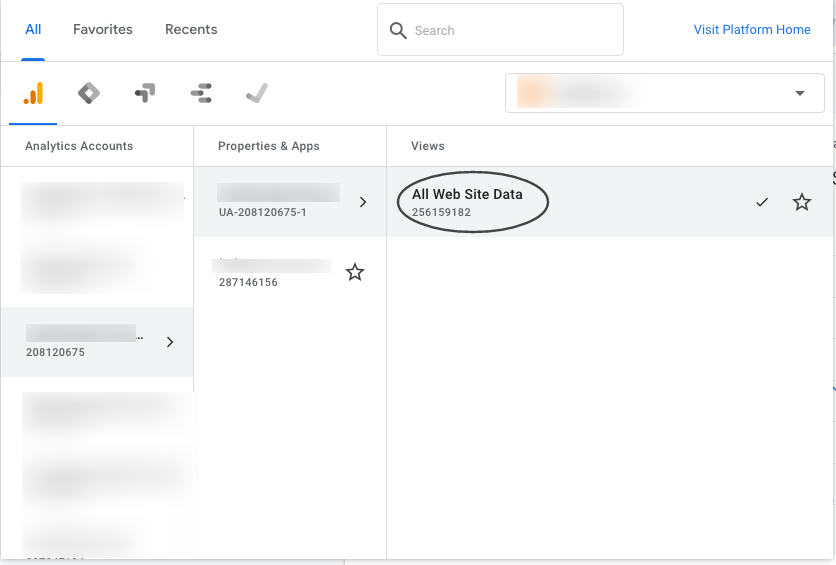
1. Select the GA4 account
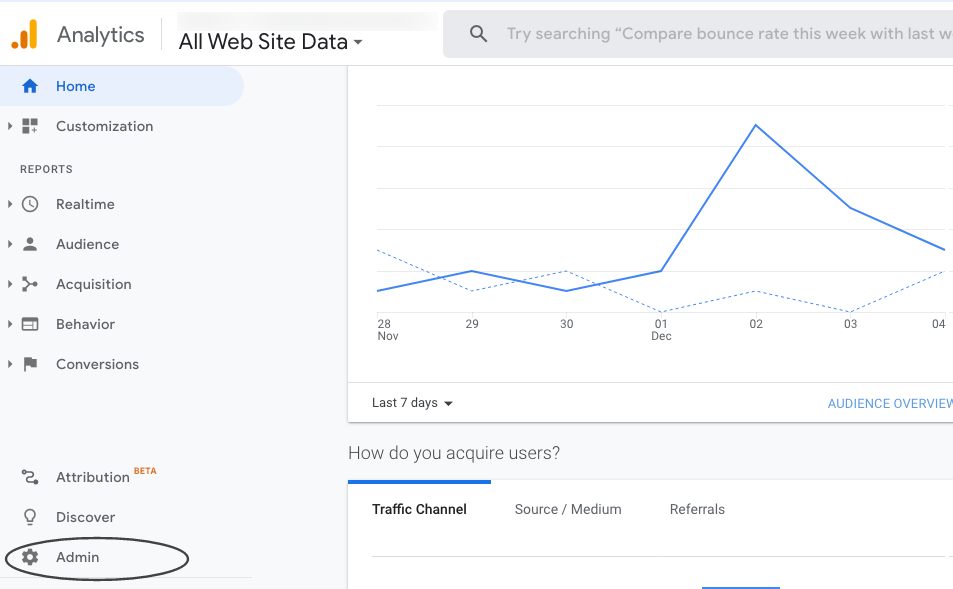
2. Select Admin
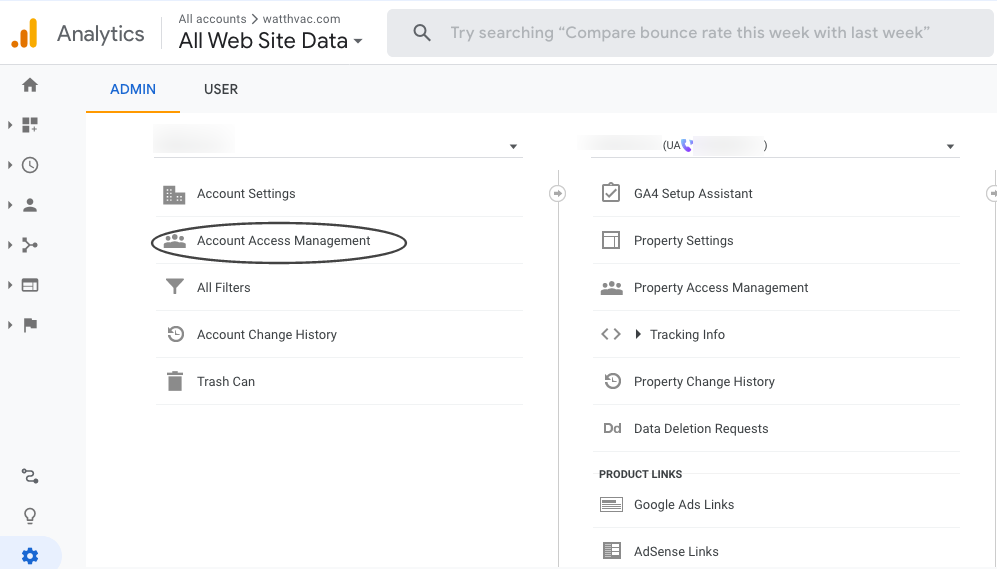
3. Go to Property —> Select GA4 Account —>
4. Click On Account Access Management
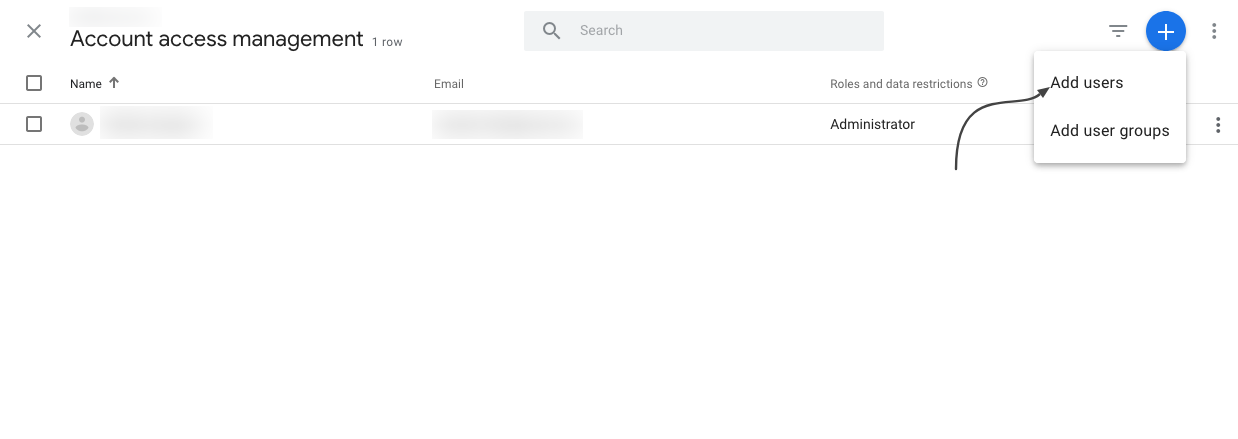
5. Click on the (Blue + right top corner) button and click on Add Users
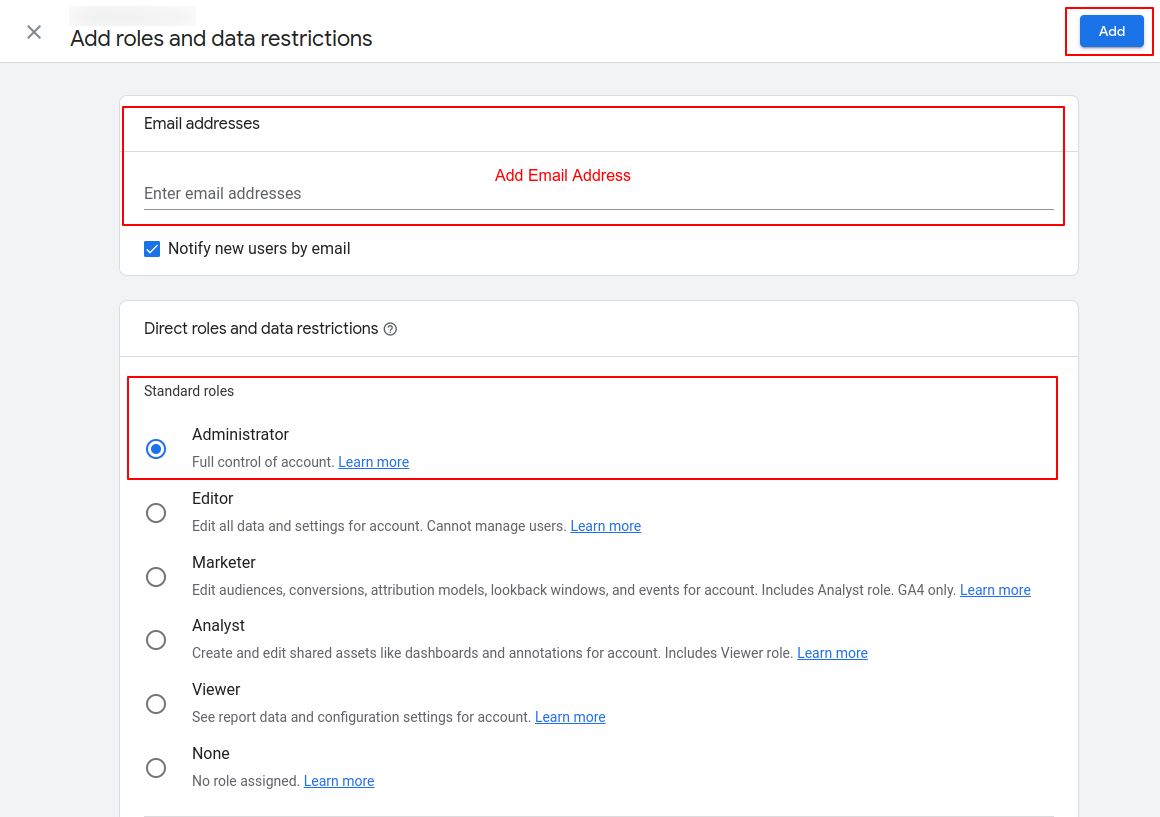
6. Add the Email ID, then select Administrator under Standard roles and click “Add”.
All set!
Please confirm with the project manager once this is done, and we will confirm access.
Importance of Adding On-Page SEO Work to the Website
During the first month of signing up, we start working on your website’s SEO optimizations. The on-page work includes:
Hx Tag Optimizations
Image Alt Optimizations
Internal Linking Optimizations
Schema & Canonical Set up
Google & Bing Search Console
Sitemap
Heatmap Code Setup
Learn more about on-page optimizations and definitions to these terms here.
Once we work on these optimizations, we get them added to your website.
What happens if MAD Monkey SEO doesn’t have access to the website?
If we don’t have admin access or access is limited to upload the work from our end, we will send you the work done via email, so the website developer can get it added. We will include instructions when sending the work. It is important to get this added during the first month of the campaign, so we don’t delay results.
What happens if the client doesn’t have the work uploaded?
Ideally, we get access and can get this added from our end. Please note that if we are not given access, we will need your assistance in getting it added to the website.
In other words, the work is done from our end, but we’ll need your help getting it added if we are not provided enough access to get it uploaded ourselves.
Why is this On-Page work important?
On-page SEO goes well beyond keywords and includes everything from headers to title tags, structured data, image optimization, and more. On-page SEO helps Google better understand your website. And that is essential to improving your rankings, which leads to more organic traffic.
There may be instances where you are not able to access areas of the platform while others are able to. In some cases, this can be linked to your Network settings blocking specific domains through which we load some of our resources that you are accessing.
In order for our Technical Support Team to better troubleshoot these types of issues, we may require your Network (HAR) File to identify these errors or the root cause of the problem. The following instructions will allow you to get your Network HAR File.
1. Go to the Login page on Business/Partner Center (or any area of the platform that you are having issues in) > Right-click on the page and select “Inspect” from the selection panel that pops up
2. In the console that pops up select the “Network” tab > Select Preserve Log > Complete the same action you were attempting to> You should see a bunch of information populate in the window that pops up
3. With the network panel open, Refresh the page and attempt the action again (if there is an action)
4. Right-click on any of the lines/info > Select “Save all as HAR File with content” > Save it to your documents or area on your PC you wish to access it from.
5. You can then email the file to the Support On Demand team upon request for us to diagnose. The HAR file may be over 35mb’s, if so we recommend file sharing with Google Drive.
Network HAR File Console.
Retrieve your HAR file from Safari
To get your HAR file in Safari, navigate to the menu bar at the top of the screen, and click on where it says “Safari” then select Preferences > Advanced.
Make sure the option “Show Develop menu in the menu bar”, the last setting, is selected like so:
Then, you should be able to proceed with getting a HAR file like normal from the browser. Right click > Inspect element > network > check preserve log > refresh page > right click on any lines that appear > select Save HAR.
Below are some of the activities we perform during the first 24-48 hours:
1. Order Confirmation & Welcome Email
First, you will get assigned a project manager and you will receive a welcome email with any questions regarding your order.
Your project manager will be your main point of contact for your campaign and communication is done via email.
Your project manager will be coordinating with our different SEO teams and send you anything that needs your revision or approval via email. You can reply to the email directly from your inbox.
*Please note this is a white-label product so we don’t typically communicate directly with the end client. All communication is through the agency partner who handles the relationship with their end client.
2. Access Check-up & Keyword Analysis. The project manager will work on the below and send you anything that requires assistance.
Check the website access is sufficient to upload the SEO work. We need Admin Access in order to upload the SEO on-page work. Website Access Guide
Check Google Analytics and Google Business Profile status and request access. Steps here
Perform a keyword research analysis and provide you with a list of recommended keywords for you to choose from.
We will also set up your SEO dashboard automatically after placing an order. After a few days, data will begin to show on your dashboard as the work progresses.
Watch this video for an overview of the SEO dashboard.
After all the initial set up is completed, we get to work on your campaign!
We put together a benchmark report to track the progress of your campaign in the coming months. Simultaneously, we start working on deliverables of your campaign such as on-page optimizations and off-page link building.
After 1 month, you will get your first report! The report will include all the work completed, benchmarks, and new rankings. You can also access the data via the SEO dashboard in real-time!
Remember, you can always access our Support Page on the website for any questions or contact us via email at [email protected]
How Can I Grant Access to Google Analytics with an Email ID?
Google Analytics (GA) is a great service that provides insight into how users find and interact with your website, tracking your website’s movement, visits, traffic, and ROI, among others.
You can manage the users who have access to your Google account. Said users are identified by their email addresses. Only users whose email addresses are registered in Google Accounts will be granted access.
Once you receive the request to provide access to your Google Analytics account, we’ll help you track and manage the activities on your website as part of the SEO work through our dashboard.
Below are the possible scenarios:
If the website has Universal Analytics set up and you need to give us access to your email ID, the steps are here
If the website has GA4 set up and you need to give access to our email ID, follow the steps here.
If the website has both codes added, please follow both steps and get us access to both codes.
Go to your WordPress admin page and log in to your website. If you’re not sure of your password, you can click “Lost Password” to reset it. There are more detailed instructions for resetting your WordPress password here.
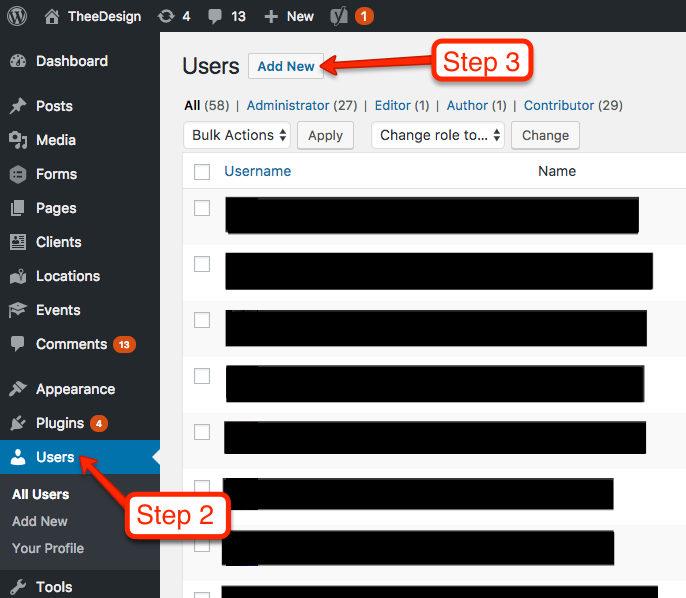
Now that you’re in the WordPress dashboard, click on Users in the left sidebar.
Towards the top of the screen, click Add New.
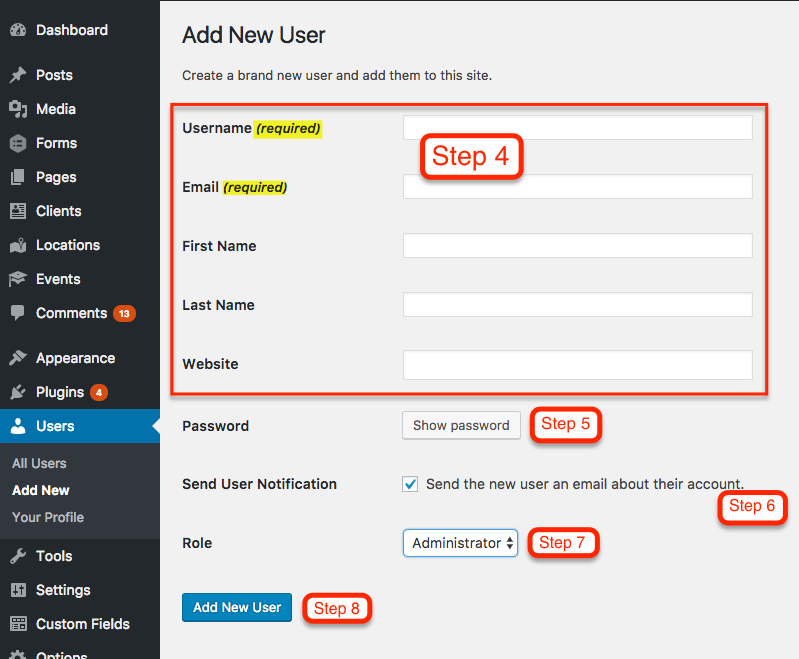
Now you should be on the Add New User screen. Enter a username and email address for your new user. First name, last name, and website are optional.
Enter a SECURE password for your new user. You can either use the one that WordPress randomly generates, or create your own. However, it’s important to use a secure password because hackers will try to use your login to compromise your website. Please choose a password with uppercase, lowercase, numbers and symbols.
Keep the Send User Notification checked if you would like the new user to receive an email with their login information.
Choose a Role for your new user. Administrator is the default and it gives the user access to all the features of the website.
Click the Add New User button and you’re all set
How to provide full CMS Access (WordPress) — See point no.7
An administrator has full and complete ownership of a website, and can do absolutely everything. This person has complete power over posts/pages, comments, settings, themes, plugins, import, users – everything. Nothing is off-limits, including deleting everything.
Which tabs access we would require in CMS to do SEO work (WordPress)-
Ask the client to provide us full administrator rights. An administrator has full and complete ownership of a website, and can do absolutely everything.
Google Business Profile is a robust directory created by Google that presents results on the branded search of your business. Google trusts and prefers its platforms. Therefore, it presents those first in the search results, which is why it is so important.
This type of access will allow sharing management of the Google Business Profile location account with confirmed users. Adding owners and managers lets users share the management of a listing without having to share personal account information. We will link the Google Business profile to our SEO dashboard and share valuable insights.
Below are the steps for providing managerial access to an email ID that your project manager will provide: