by admin | Oct 30, 2025 | Access Related Questions, Getting Started, Google, Google Properties, Onboarding MAD SEO, Uncategorized
How To Grant Access On UA/Google Analytics 3
Steps to Provide Access to UA/Google Analytics 3
See below the steps for providing managerial access to an email ID that your project manager will provide:
1. Log in to your Google Analytics account: (https://analytics.google.com/)
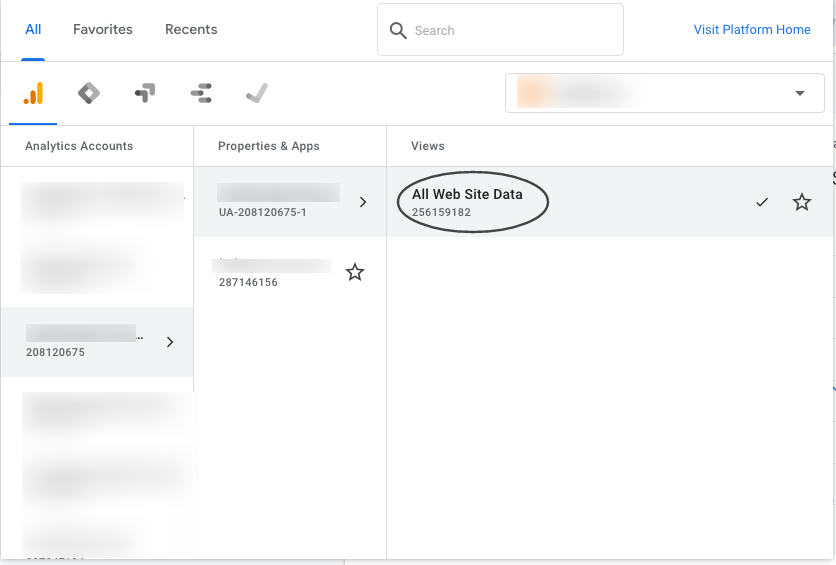
2. Search your .com (with the domain name or Google Analytics code)

3. Click on “All Website Data”

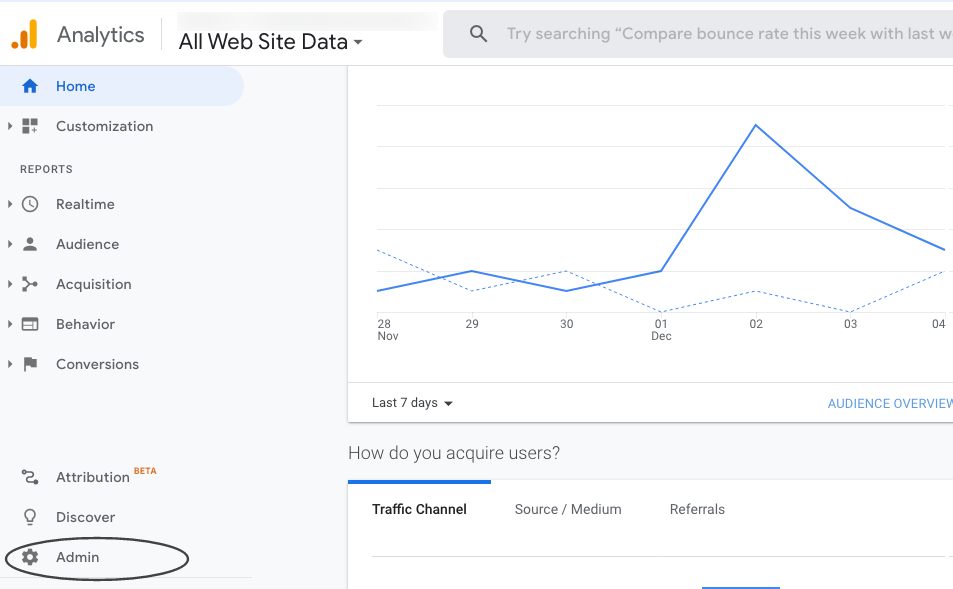
4. Click on “Admin”

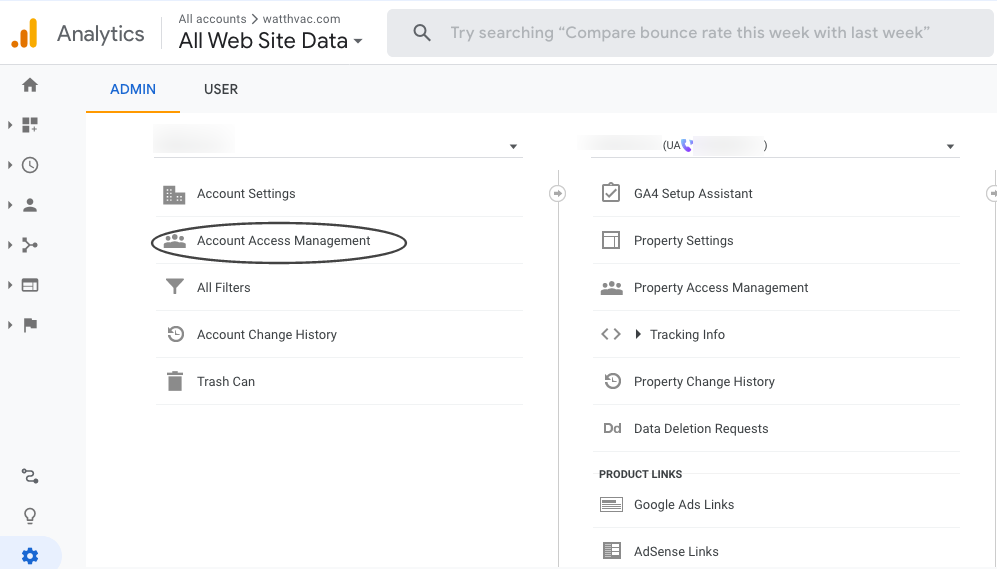
5. Click on “Account Access Management”

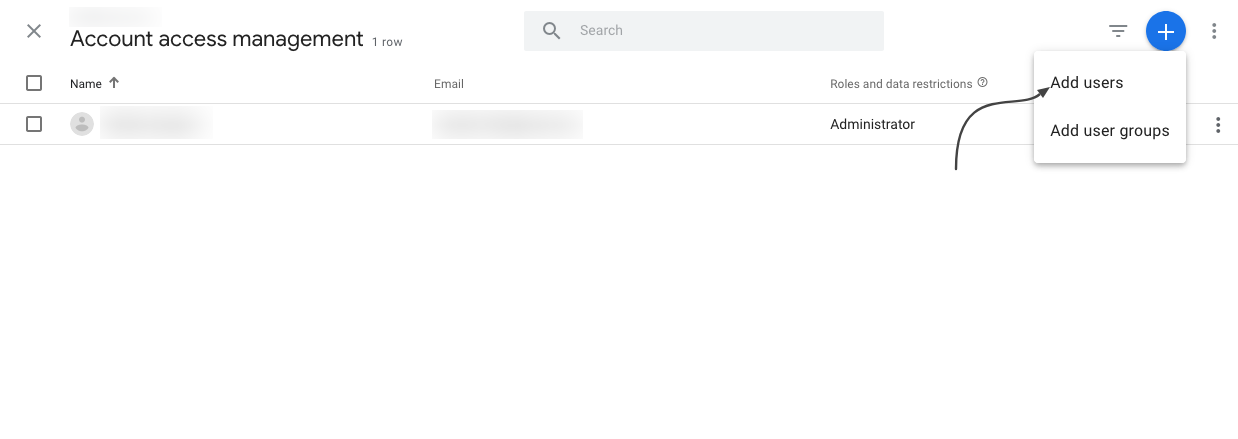
6. Click on “+” icon, choose “Add Users” and enter the email ID

7. Full access should now be granted

For any questions, contact [email protected]
by admin | Oct 30, 2025 | Getting Started, Google, Google Properties, Onboarding MAD SEO
Steps to Provide Access to Google Analytics 4
Google Analytics 4 is replacing Universal Analytics. On July 1, 2023, all standard Universal Analytics properties will stop processing new hits. Alpha SEO is already aware of this change, and we are working to integrate this update into our dashboard.
Please follow the steps below to grant access to Google Analytics 4 (GA4) to the email ID that the project manager will provide.
1. Select the GA4 account

2. Select Admin

3. Go to Property —> Select GA4 Account —>

4. Click On Account Access Management

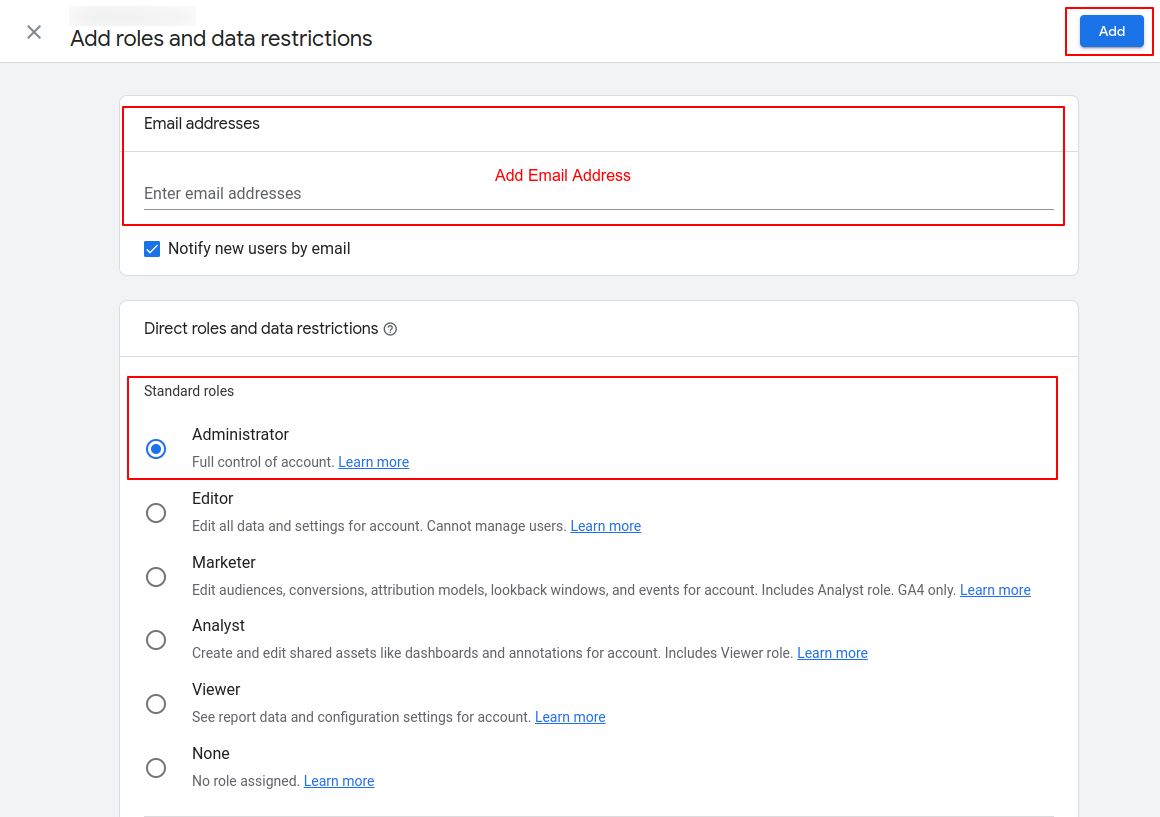
5. Click on the (Blue + right top corner) button and click on Add Users

6. Add the Email ID, then select Administrator under Standard roles and click “Add”.

All set!
Please confirm with the project manager once this is done, and we will confirm access.
For any questions, contact [email protected]
by admin | Jul 2, 2025 | Getting Started, Onboarding MAD SEO
After placing an order in MAD Monkey Media Digital Store, The MAD Monkey SEO team gets to work for you!
Check out this short video.
Below are some of the activities we perform during the first 24-48 hours:
1. Order Confirmation & Welcome Email
- First, you will get assigned a project manager and you will receive a welcome email with any questions regarding your order.
- Your project manager will be your main point of contact for your campaign and communication is done via email.
- Your project manager will be coordinating with our different SEO teams and send you anything that needs your revision or approval via email. You can reply to the email directly from your inbox.
*Please note this is a white-label product so we don’t typically communicate directly with the end client. All communication is through the agency partner who handles the relationship with their end client.
2. Access Check-up & Keyword Analysis. The project manager will work on the below and send you anything that requires assistance.
- Check the website access is sufficient to upload the SEO work. We need Admin Access in order to upload the SEO on-page work. Website Access Guide
- Check Google Analytics and Google Business Profile status and request access. Steps here
- Perform a keyword research analysis and provide you with a list of recommended keywords for you to choose from.
- Check out our Resource Page for help with access and FAQ’s: https://madmonkey.media.com/resources/
3. Dashboard Set-up
- We will also set up your SEO dashboard automatically after placing an order. After a few days, data will begin to show on your dashboard as the work progresses.
- Click here to learn how to access your SEO dashboard. If after following these instructions you still have issues accessing your SEO dashboard, please contact your MAD Monkey Media representative.
- Watch this video for an overview of the SEO dashboard.
After all the initial set up is completed, we get to work on your campaign!
We put together a benchmark report to track the progress of your campaign in the coming months. Simultaneously, we start working on deliverables of your campaign such as on-page optimizations and off-page link building.
After 1 month, you will get your first report! The report will include all the work completed, benchmarks, and new rankings. You can also access the data via the SEO dashboard in real-time!
Remember, you can always access our Support Page on the website for any questions or contact us via email at [email protected]
by admin | Jul 2, 2025 | Getting Started, Google Properties, Onboarding MAD SEO
How Can I Grant Access to Google Analytics with an Email ID?
Google Analytics (GA) is a great service that provides insight into how users find and interact with your website, tracking your website’s movement, visits, traffic, and ROI, among others.
You can manage the users who have access to your Google account. Said users are identified by their email addresses. Only users whose email addresses are registered in Google Accounts will be granted access.
Once you receive the request to provide access to your Google Analytics account, we’ll help you track and manage the activities on your website as part of the SEO work through our dashboard.
Below are the possible scenarios:
- If the website has Universal Analytics set up and you need to give us access to your email ID, the steps are here
- If the website has GA4 set up and you need to give access to our email ID, follow the steps here.
- If the website has both codes added, please follow both steps and get us access to both codes.