Access and Permissions
Ad accounts: add your own payment method
Google and Meta bill ad spend straight to you, at cost. Add your card in each ad account so campaigns can launch.
Updated 2026-11-18
Ad spend is billed by Google and Meta directly to your card. We never hold, touch or mark up your ad money, and we never ask for card numbers. Our management fee is separate and is paid through the secure pay link on our website.
Time: about 5 minutes.
Before you start: sign in with the account that owns the ad account. Have your business card ready. Only you type card details, on Google or Meta, never in an email or a call.
We never need your password or the 6-digit codes your phone gets. You add us as a user, and you can remove us at any time.
Video walkthroughA short video is coming here soon. Until then, follow the steps and pictures below.
Google Ads
- Sign in to ads.google.com. Open Billing in the left menu, then Payment methods (or Settings).
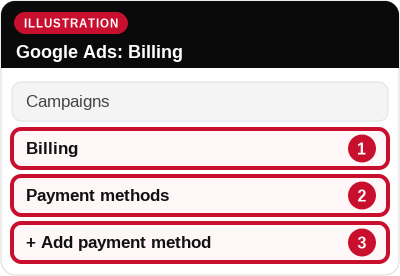
AD-01: Google Ads Billing with Payment methods. Drawing for guidance; your screen may look a little different. - Click Add payment method, enter your business card, and make it the primary method. Choose automatic payments if Google offers it.
Meta (Facebook and Instagram ads)
- Go to Meta Billing and payments and pick your ad account at the top.
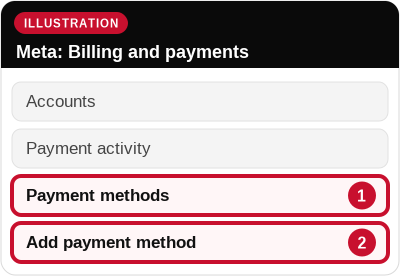
AD-02: Meta Billing and payments with Payment methods. Drawing for guidance; your screen may look a little different. - Open Payment methods, click Add payment method, enter your card and save. Set a spending limit only if we agree one together.
Budgets and approvals
Nothing launches and no budget changes without your written approval. The monthly ad budget we agree is a cap we manage to, and you can see every charge in your own billing screens.
How to know it worked
Your billing screen shows your card as the primary payment method and no payment warning at the top. Tell us and we check from our side.
If something does not work
- Card declined: call your bank to allow charges from Google or Meta, then try again.
- Someone asks for your card number by email or phone, saying they are us: do not share it. Call us at 1 (800) 858-1639.
Official help
- Google Ads Help (search "add a payment method")
- Meta Business Help Center (search "add a payment method")
Back to Start here: your onboarding checklist.
Rather do it together?Call us and we will walk you through it in a few minutes.
Call 1 (800) 858-1639Was this helpful? Send feedback