Access and Permissions
Brand assets and photos: share one folder with us
Share your logo, colors, fonts and your best recent photos and clips in one shared folder.
Updated 2026-11-18
So everything we make looks and sounds like you. One shared folder works: Google Drive, Dropbox, OneDrive, or the upload link we send from MAD Drive.
Time: about 10 minutes.
We never need your password or the 6-digit codes your phone gets. You add us as a user, and you can remove us at any time.
Video walkthroughA short video is coming here soon. Until then, follow the steps and pictures below.
What to put in the folder
- Logo files, vector (AI, EPS, SVG or PDF) if you have them, plus PNG.
- Brand colors and fonts, or a brand guide.
- Taglines, words you always use, and anything off limits.
- Your best recent photos and short clips of your people, space and work.
- Shots you love, and shots you never want again.
Share it
- Make a folder named MAD Monkey Media - Your Business, add the files, and share it with miguel@madmonkey.media as Viewer (Editor if you want us to add files back).
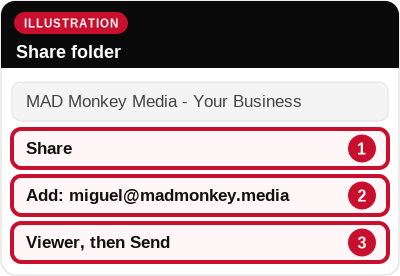
BR-01: Share folder with our email as Viewer. Drawing for guidance; your screen may look a little different. - Got an upload link from us instead? Open it and drag the files in; no account needed.
How to know it worked
We reply with what we received and a short list of anything else worth capturing.
Back to Start here: your onboarding checklist.
Rather do it together?Call us and we will walk you through it in a few minutes.
Call 1 (800) 858-1639Was this helpful? Send feedback