Access and Permissions
Wix: invite us as a site collaborator
Invite us to your Wix site with the Admin role from Roles and Permissions.
Updated 2026-11-18
Wix lets you invite collaborators to one site without sharing your login. Admin lets us add tracking, edit pages and manage SEO settings.
Who to add: miguel@madmonkey.media (MAD Monkey Media). Our access request comes from Juan at support@madmonkey.media (client support), with Miguel on copy.
Time: about 3 minutes.
We never need your password or the 6-digit codes your phone gets. You add us as a user, and you can remove us at any time.
Video walkthroughA short video is coming here soon. Until then, follow the steps and pictures below.
Steps
- Sign in to wix.com and open your site dashboard.
- Go to Settings, then Roles and Permissions.
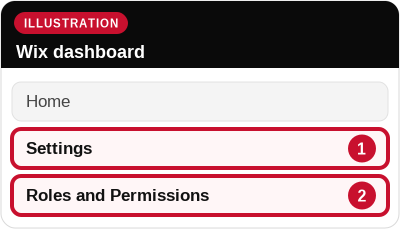
WX-01: Wix Settings with Roles and Permissions. Drawing for guidance; your screen may look a little different. - Click Invite People, enter miguel@madmonkey.media, choose Admin (Co-owner only if we ask) and click Send Invite.
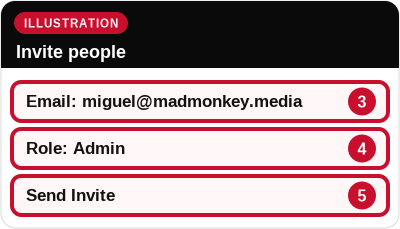
WX-02: Invite people with email and Admin role. Drawing for guidance; your screen may look a little different.
How to know it worked
Roles and Permissions shows our email as Invited, then Active once we accept.
Official help
Back to Start here: your onboarding checklist.
Rather do it together?Call us and we will walk you through it in a few minutes.
Call 1 (800) 858-1639Was this helpful? Send feedback