Access and Permissions
Add a new admin user to your WordPress site
Give our team Administrator access so we can upload your SEO work.
Updated 2025-07-02
- Sign in to your WordPress admin (usually yoursite.com/wp-admin). Forgot your password? Choose Lost your password? on the login page.
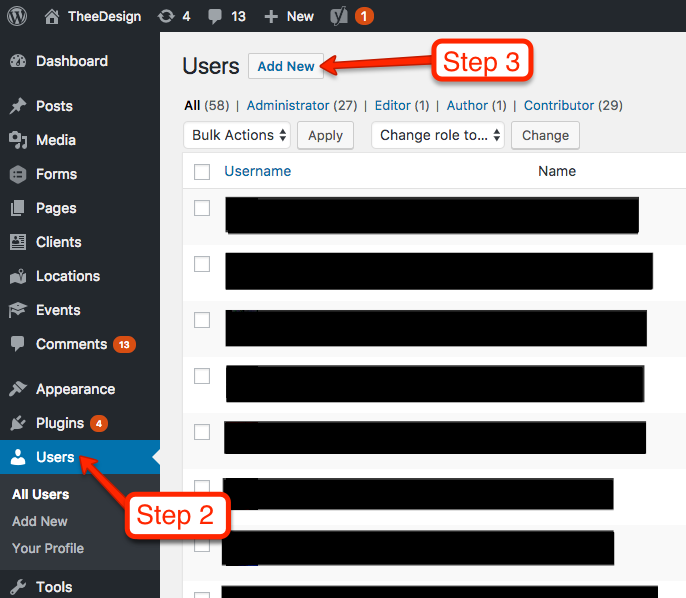
- In the left menu choose Users, then Add New User.
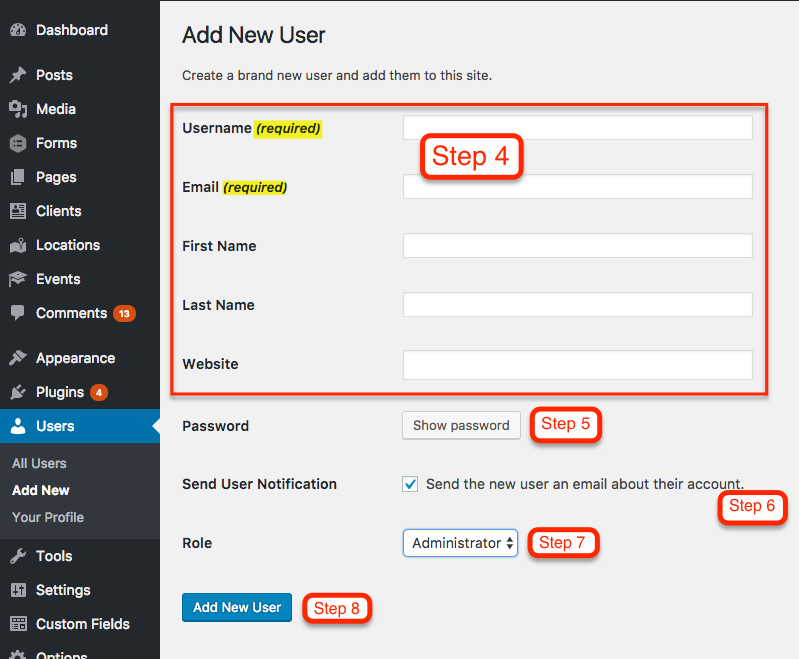
- Enter a username and the email address from your project manager. First name, last name and website are optional.
- Use the strong password WordPress suggests, or create one with uppercase and lowercase letters, numbers and symbols.
- Keep Send User Notification checked so we get the login email.
- Set Role to Administrator.
- Choose Add New User.
Why Administrator?
On-page SEO touches pages, settings, themes and plugins, so we need full Administrator rights to upload the work.
Was this helpful? Send feedback