How Can I Grant Access to Google Analytics with an Email ID?
Google Analytics (GA) is a great service that provides insight into how users find and interact with your website, tracking your website’s movement, visits, traffic, and ROI, among others.
You can manage the users who have access to your Google account. Said users are identified by their email addresses. Only users whose email addresses are registered in Google Accounts will be granted access.
Once you receive the request to provide access to your Google Analytics account, we’ll help you track and manage the activities on your website as part of the SEO work through our dashboard.
Below are the possible scenarios:
If the website has Universal Analytics set up and you need to give us access to your email ID, the steps are here
If the website has GA4 set up and you need to give access to our email ID, follow the steps here.
If the website has both codes added, please follow both steps and get us access to both codes.
Go to your WordPress admin page and log in to your website. If you’re not sure of your password, you can click “Lost Password” to reset it. There are more detailed instructions for resetting your WordPress password here.
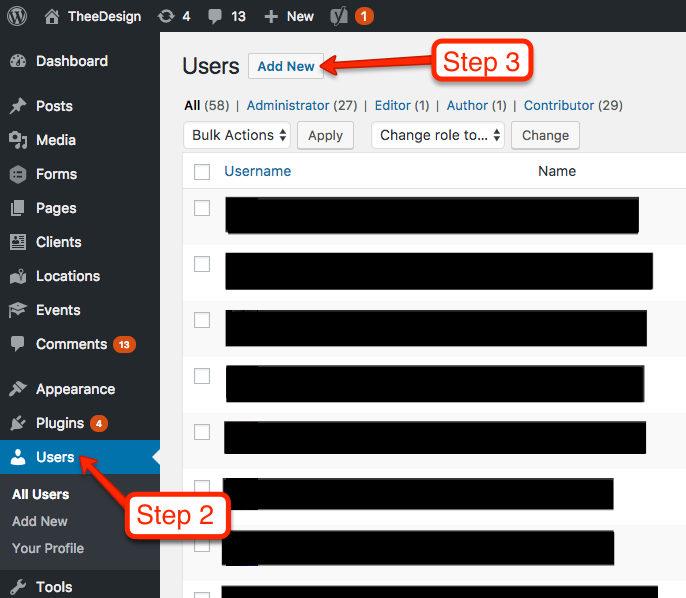
Now that you’re in the WordPress dashboard, click on Users in the left sidebar.
Towards the top of the screen, click Add New.
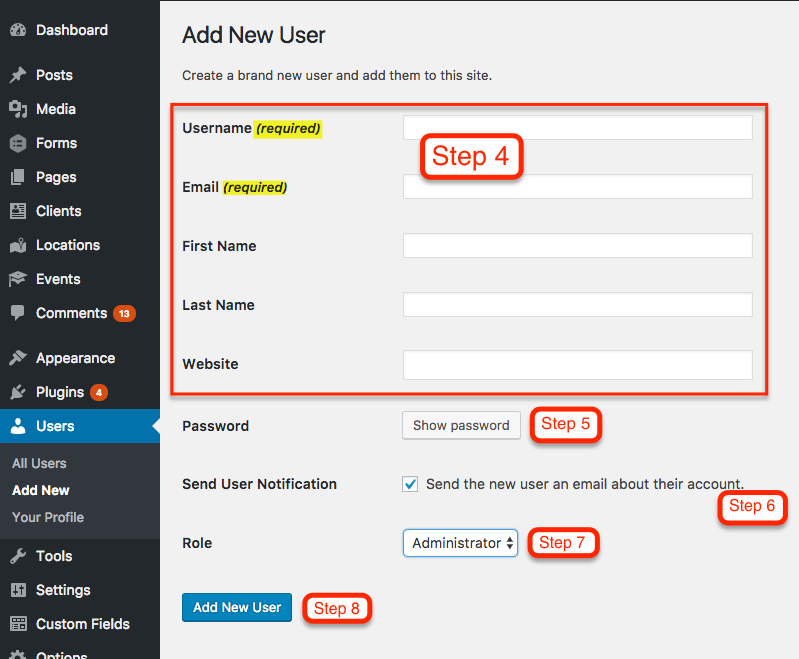
Now you should be on the Add New User screen. Enter a username and email address for your new user. First name, last name, and website are optional.
Enter a SECURE password for your new user. You can either use the one that WordPress randomly generates, or create your own. However, it’s important to use a secure password because hackers will try to use your login to compromise your website. Please choose a password with uppercase, lowercase, numbers and symbols.
Keep the Send User Notification checked if you would like the new user to receive an email with their login information.
Choose a Role for your new user. Administrator is the default and it gives the user access to all the features of the website.
Click the Add New User button and you’re all set
How to provide full CMS Access (WordPress) — See point no.7
An administrator has full and complete ownership of a website, and can do absolutely everything. This person has complete power over posts/pages, comments, settings, themes, plugins, import, users – everything. Nothing is off-limits, including deleting everything.
Which tabs access we would require in CMS to do SEO work (WordPress)-
Ask the client to provide us full administrator rights. An administrator has full and complete ownership of a website, and can do absolutely everything.
Google Business Profile is a robust directory created by Google that presents results on the branded search of your business. Google trusts and prefers its platforms. Therefore, it presents those first in the search results, which is why it is so important.
This type of access will allow sharing management of the Google Business Profile location account with confirmed users. Adding owners and managers lets users share the management of a listing without having to share personal account information. We will link the Google Business profile to our SEO dashboard and share valuable insights.
Below are the steps for providing managerial access to an email ID that your project manager will provide: